
- Resources
- Blog
eSIM Profile Management: Step by step with Kigen Pulse
 Bee Hayes-Thakore
 Kigen Pulse for eSIM Profile Management at Scale
When you ship connected devices into the field, control shifts from the lab to real-world networks, real-world risk, and real-world operational pressure. That’s why eSIM profile operations—securely downloading, enabling, disabling, switching, and auditing operator profiles—become a core control plane as your IoT fleet or consumer estate grows. Under the hood, these actions are delivered via Remote SIM Provisioning (RSP) and directly shape uptime, security posture, and the cost of change once devices are deployed.
Kigen Pulse, available with Kigen eIM is built to make those profile operations simple to execute and easy to prove, with a unified console, clear device and profile history, and developer-friendly integration points.
Why eSIM Profile Operations Matter for Secure Connected Devices
As deployments scale, the SIM or eSIM is no longer a “component,” it’s a hardware-rooted identity and policy anchor. eSIM profile operations let you control that identity over time, which means you can:
- Maintain continuity when coverage, carrier terms, or roaming rules change
- Reduce truck rolls by updating connectivity remotely
- Support segmented OT architectures by keeping connectivity governed, auditable, and repeatable
The result is not just “securing the network connections,” but operational control—especially when your devices sit on the OT plane, and failure has consequences in a world where we enter into the new “intelligence era”.
Increasing Demand for eSIM, RSP, and Developer-Grade Control
The market pull is coming from multiple directions, and they all converge on the same need: fast, secure, remote profile control.
Travel eSIM adoption has normalized digital activation and profile switching expectations for consumers and the ecosystem.
Private cellular networks (LTE/5G) are accelerating across industrial sites, stadia, and campuses, where coverage, policy, and ownership models differ from public networks, and connectivity must align with OT requirements.
SGP.32 (IoT eSIM) is simplifying IoT-specific RSP architectures, shifting the industry toward more scalable lifecycle management patterns for constrained devices.
Kigen Pulse fronts the eSIM Profile operations and eSIM subscription management with leading features of the GSMA SAS-certified hosted Kigen eIM, fully compliant to SGP.32 standards. You can read more about Kigen eIM here.
Kigen Pulse for Embedded Developers and OT Solution Architects
Kigen Pulse provides a unified “single-pane” experience for eSIM and profile lifecycle management, designed for both day-to-day operations and deeper engineering workflows.
For developers, it supports integration via Open API specifications, so you can embed eSIM lifecycle visibility and actions into your own tooling, CI/CD flows, or fleet operations portal.
For IT/OT solution architects, it provides the operational clarity you need to govern change: traceable actions, simplified user flows, and batch operations (“campaigns”) to execute RSP tasks consistently across large fleets. Kigen Pulse features are uniquely designed to help IT/OT solution architects to maximize uptime, scale across product portfolios or asset estate, and meet the requirements of emerging cybersecurity regulations such as the EU Cybersecurity Resilience Act, NIST-2 and EO 14028.
It can be easily integrated into cross-connectivity provider “Single Pane of Glass Visibility” for dynamic data pricing and planning of subscriptions with leading SPoG platforms, such as Simetric.
Walkthrough: Kigen Pulse
This eSIM IoT step-by-step guide explains the process of remotely managing your SIM or eSIMs (or iSIMs) with Kigen Pulse as defined by the GSMA SGP.32 specifications for IoT.
Kickstart your SGP.32 journey with your preferred IoT modules
Secure with Kigen modules offer embedded developers versatile starting points for secure cellular product development, with the freedom to choose the latest networks—LTE-M, Cat-1, NB-IoT, Cat-1bis, and more—to match coverage, power, and footprint needs. Extensively tested with Kigen eIM and leading eSIM connectivity providers, we’re proud to feature some of the most popular, widely adopted modules in the industry, making it easier to prototype quickly and scale confidently from lab to deployment.
View all available modules and EVKs
Quick Navigation
Viewing your eSIMs in Kigen Pulse.
Installing a new profile to your eSIMs in Kigen Pulse.
- Access pulse.kigen.com
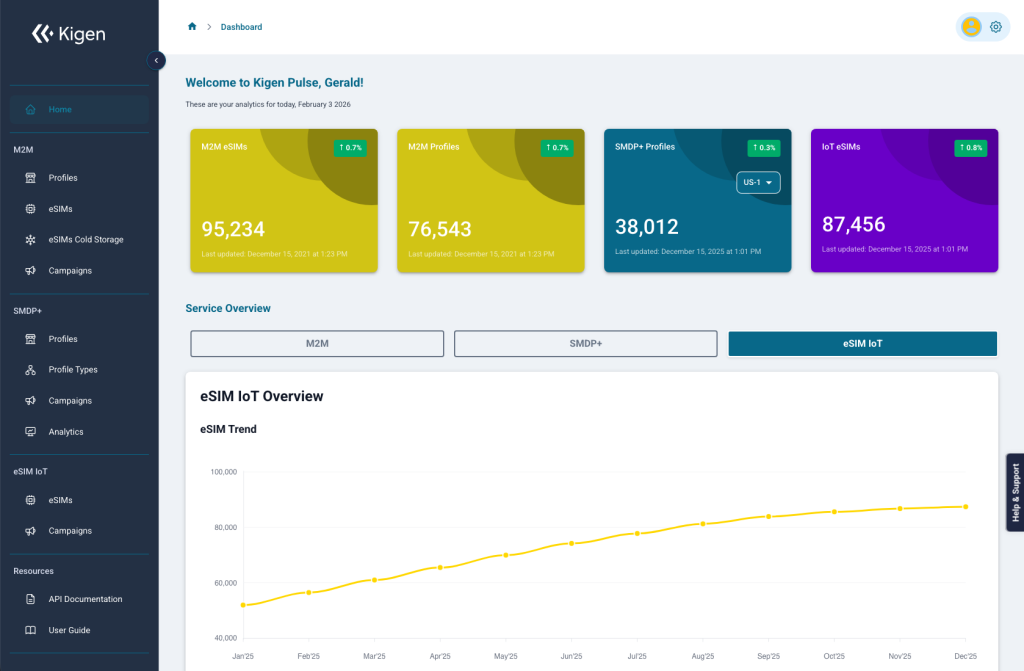
2. View your eSIM Inventory. Navigate to eSIM IoT > eSIMs
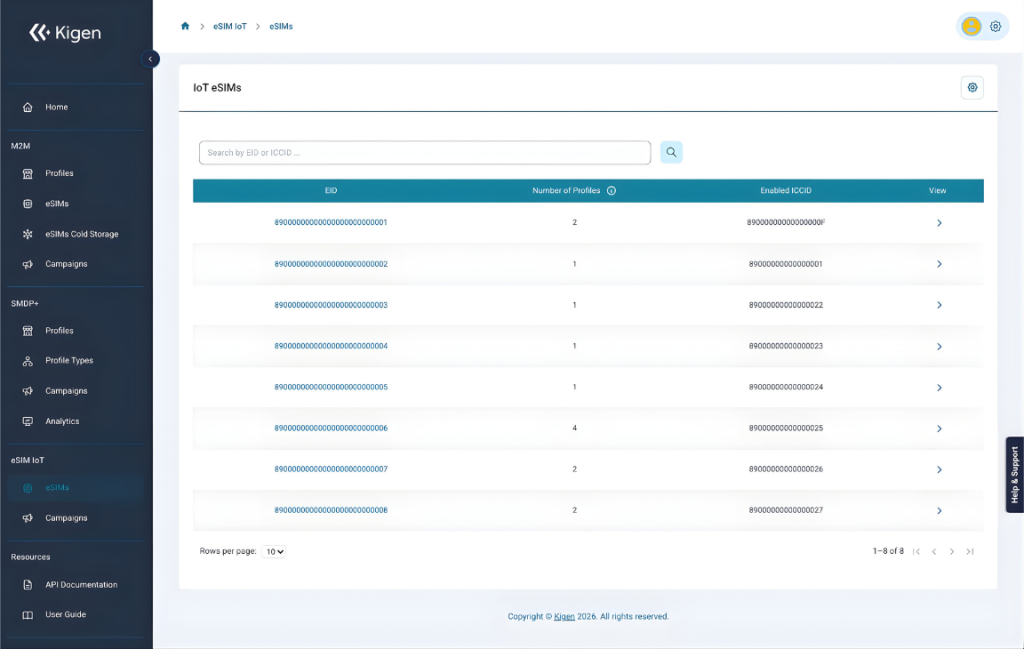
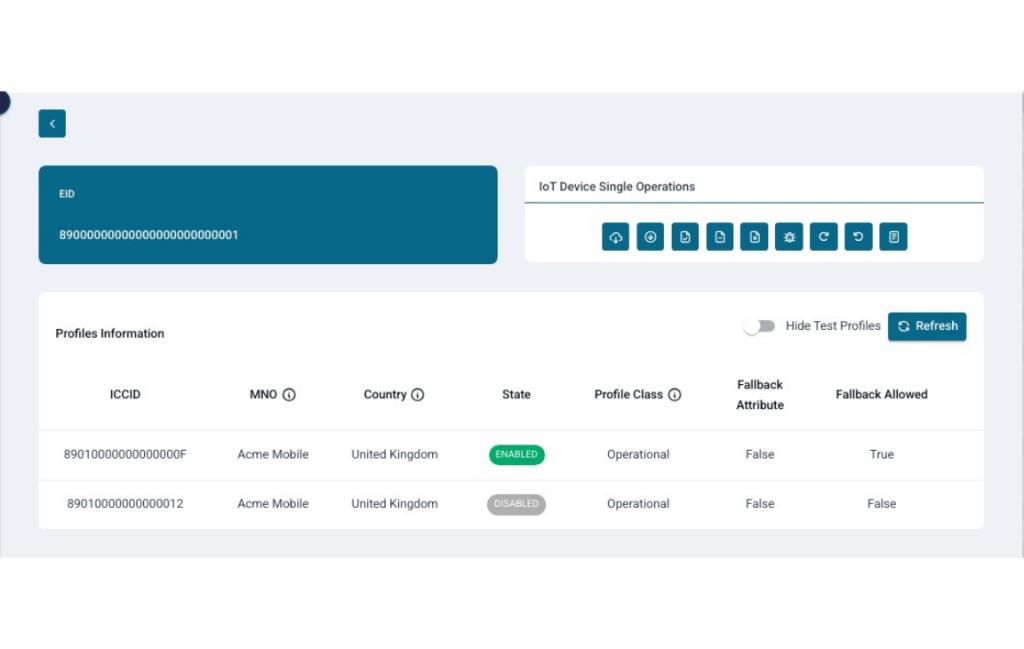
3. Select your target eSIM – identified by EID. Here you can see the current profiles’ information on which profile is enabled.
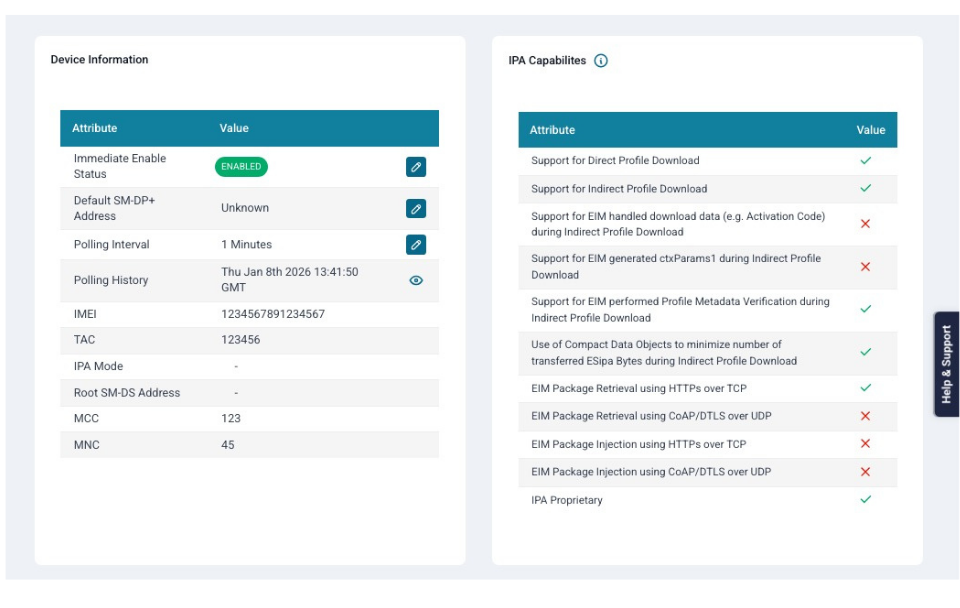
Scroll further for some additional details on the configuration of the device and eIM attributes, such as MNC/MCC, Polling Interval, IPA Capabilities, etc
Update the eSIM Profile
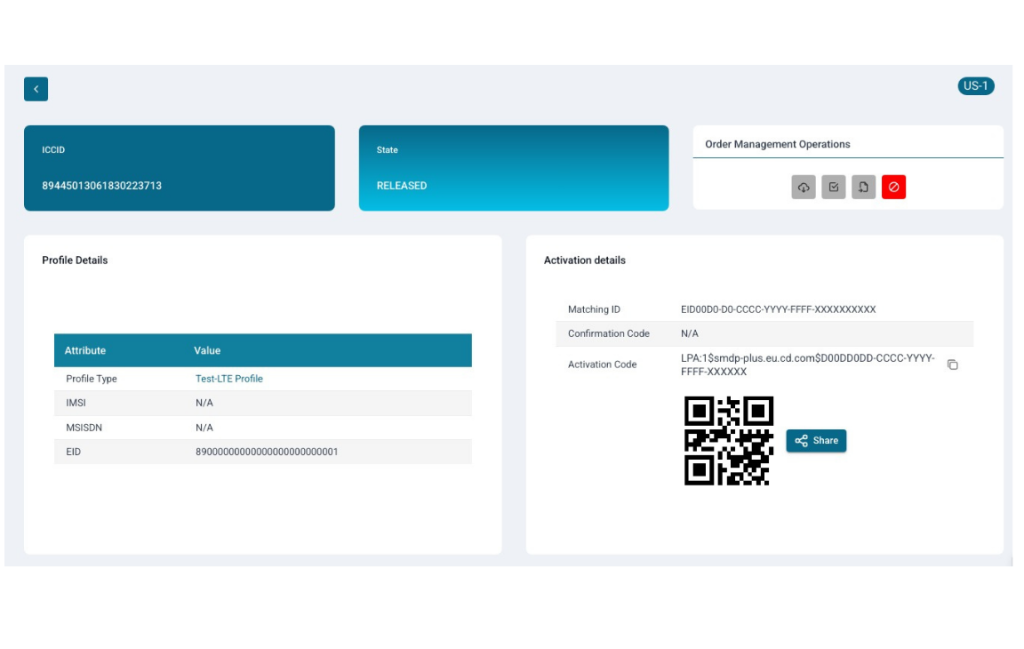
4. When using eSIM Profiles from Kigen, navigate to Consumer > Profiles
Select a profile in the RELEASED state
Find the Activation Code in the bottom right corner. Copy the code after LPA: starting with 1$.
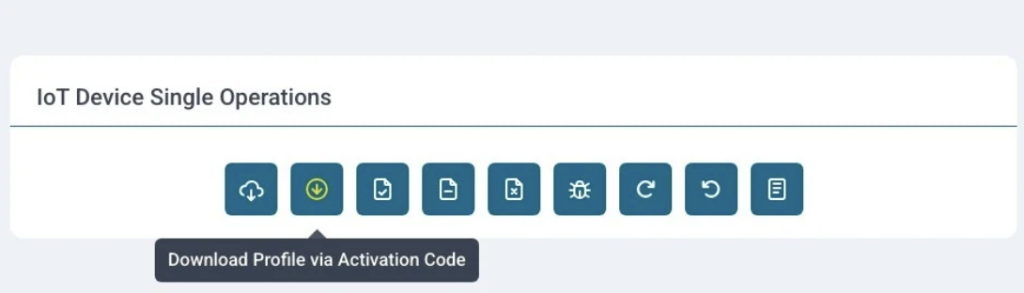
5. Navigate to eSIM IoT > eSIMs and select your EID
In the “IoT Device Single Operations” select “Download Profile via Activation Code”
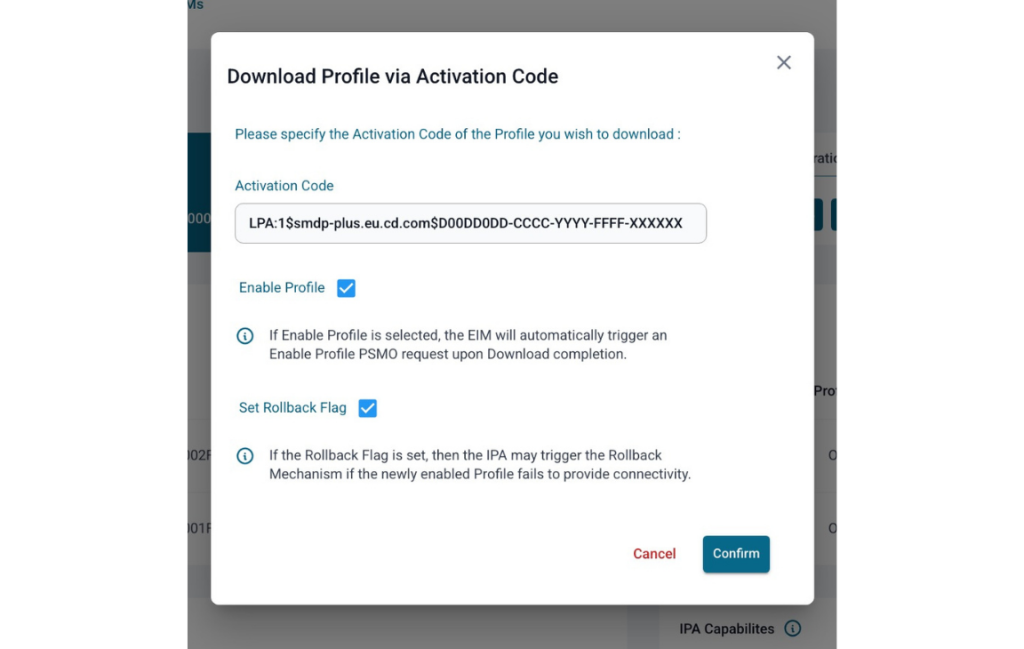
6. Paste the Activation Code.
Optionally, you can choose to immediately enable the profile and set the rollback flag to rollback to the previously enabled profile should the new profile fail to get connectivity
Press Confirm
The activation code will likely start with: 1$
7. Scroll to the “In Flight Operations” tab.
Here you will see the Download Operation queued.
An enable operation will also be queued if enable was selected.
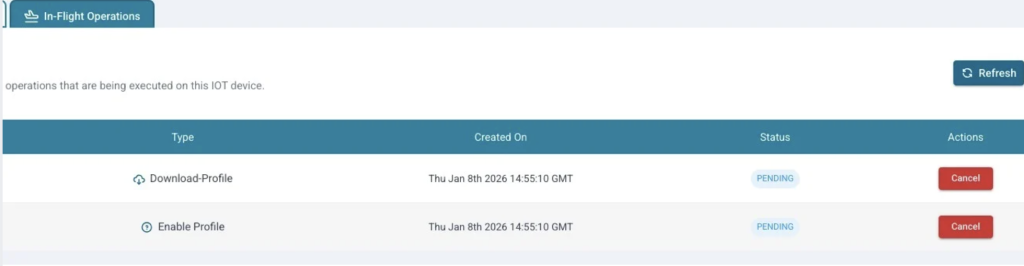
The status of an operation will change to In-Progress once the eIM has received a Poll from the SIM. This indicates the communication between eIM and IPA has begun.
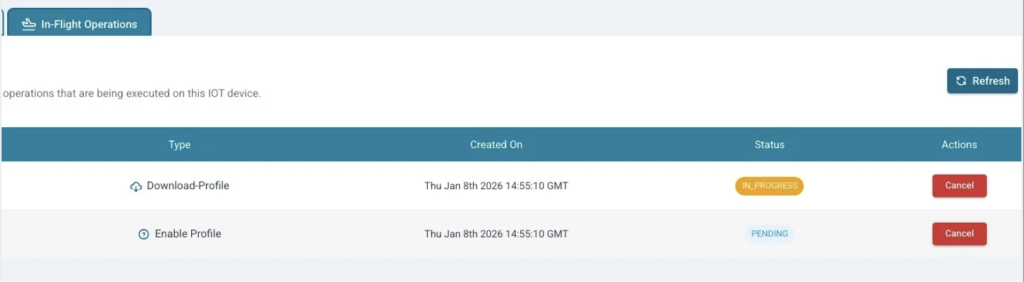
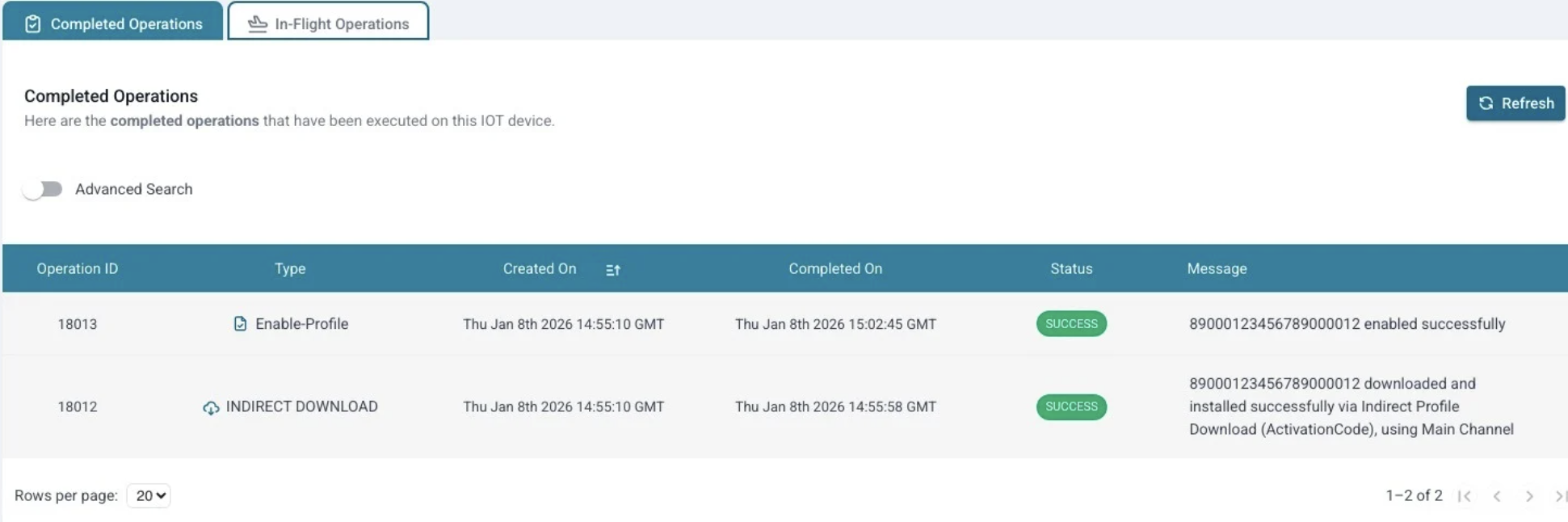
8. Once the operation has completed, view the “Completed Operations” tab to view the execution status of the operations.
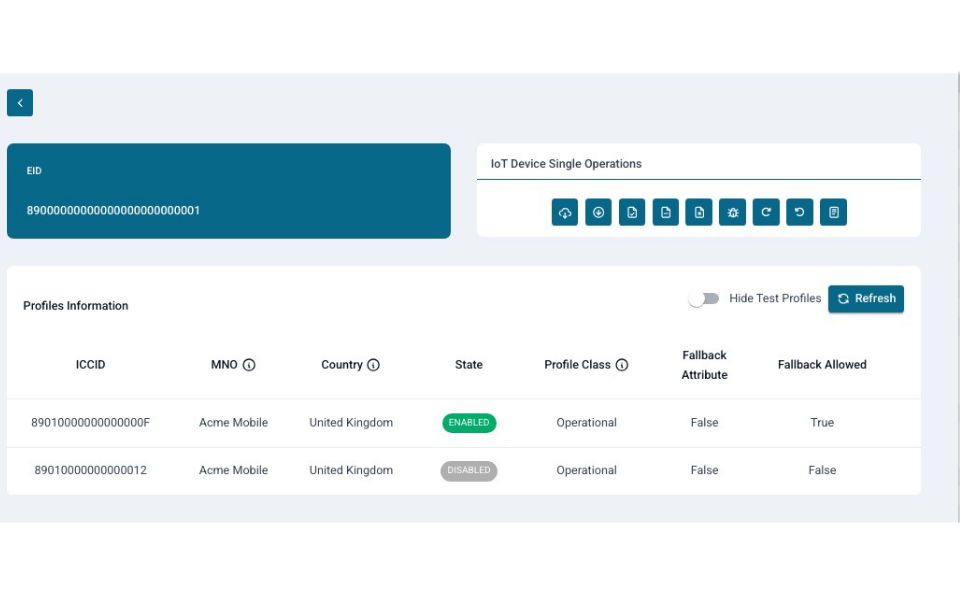
9. Scroll back to the EIS information section, and refresh. You will see your newly downloaded (and optionally enabled profile).
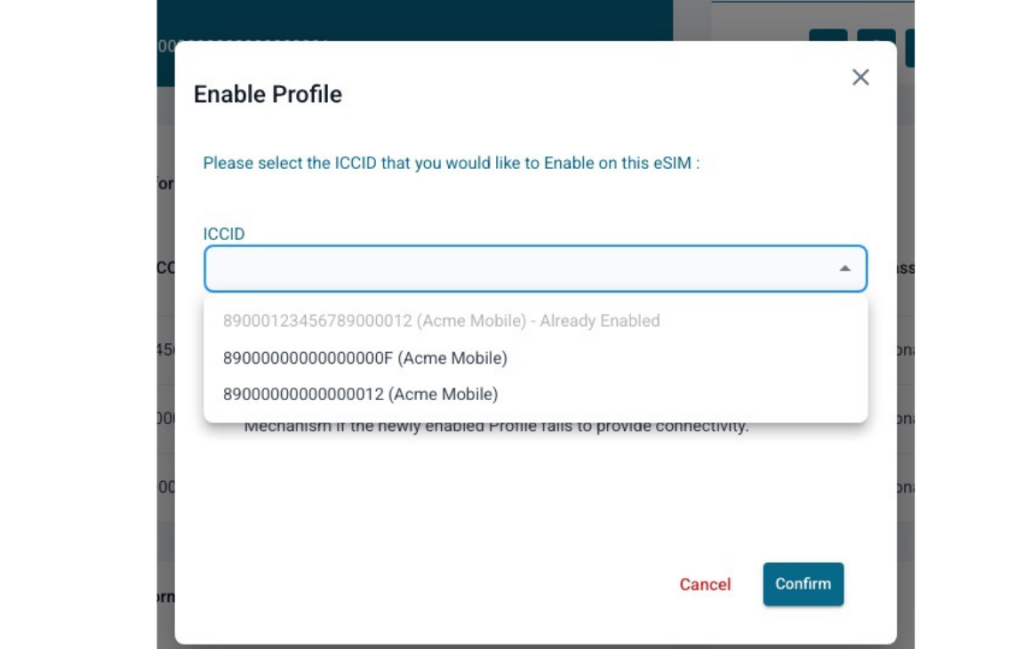
10. If you wish to perform an enable profile independently of a download, you can select the “Enable Profile” operation from the “IoT Device Single Operations” section.
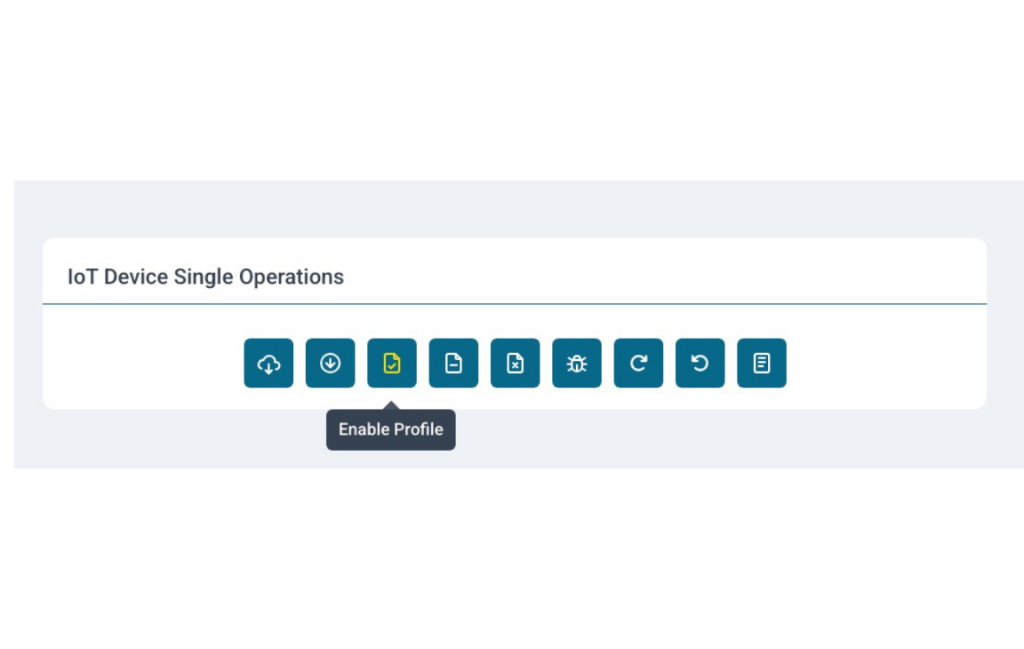
11. Then select the profile you wish to enable from the dropdown box, and press confirm. Follow steps 6-8 to view the operation from in progress to completed.
Once acknowledged, run the AT Commands on your device to request the IMSI and UICC of the SIM. If the SIM was enabled successfully, you will see the new IMSI and ICCID.
Et Voila! Your new eSIM profile has been enabled.
Design In Simplicity, Before You Scale
The fastest way to lose time in connected product delivery is to treat eSIM lifecycle control as an afterthought. If you design for secure profile operations early—using a platform approach—you get cleaner architectures, smoother rollouts, and fewer “urgent” fixes later.
Kigen Pulse helps teams move from one-off connectivity handling to repeatable, secure, scalable eSIM profile operations, so your devices stay controllable long after they ship.
Take it further:
Looking at how to integrate and get most utility from eSIMs in your device?
Read our device integration guide.
Looking for brining secure reliable connectivity into the factory?
Read our guide to product handovers with In-Factory Profile Provisioning.
Designing products for EU market? Get ready for security updates in field for CRA compliance:
Watch our expert help you connect CRA-compliant eSIM choices.
Along with these handy ‘long-reads’: